Best Interval Timer Apps for Apple Watch in 2026
GymPulseTimer is our pick for the best Apple Watch interval timer in 2026: its watch app runs the whole session independently on the wrist once presets sync from the iPhone, with haptic phase cues, a complication for one-tap launch, HealthKit logging, and a one-time $4.99 Pro upgrade — no subscription. Leave your phone in the locker; we compare the top contenders for HIIT, strength training, and CrossFit.
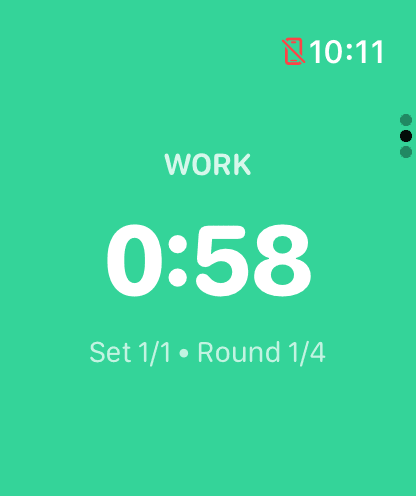
GymPulseTimer running the work phase independently on Apple Watch once presets have synced — phone stays in the locker, with a haptic tap at every phase change.
What Makes a Great Apple Watch Interval Timer in 2026
The bar for an Apple Watch interval timer has moved. In 2026, four things separate a credible wrist-based interval timer from a leftover companion app, and any shortlist that ignores them is wasting your time.
The first is a watch app that runs the session independently rather than an iPhone-tethered mirror. A mirrored app needs the phone unlocked and in Bluetooth range; the moment you drop it in a locker, the timer dies. An independent watch app runs the entire interval session — work, rest, get-ready, rounds, and sets — on the watch itself, so you can train phone-free.
The second is haptic phase cues. In a noisy gym, audio gets drowned out by music and clanging plates. A distinct tap pattern on your wrist when rest ends and work begins is the most reliable signal there is — you feel the transition without looking at the screen mid-burpee.
The third is a complication on your watch face for one-tap launch. Scrolling the honeycomb app grid with chalked-up fingers between sets is friction; a complication drops you straight into your last preset. Pair that with iCloud preset sync from the iPhone and your wrist is ready before you reach the rack.
The fourth is one-time pricing instead of a subscription. For a tool you use every session, a $6 monthly tier is hard to defend against a one-time upgrade you own forever. Very few apps clear all four bars at once — most rivals either only mirror from the iPhone, lack a real Watch app, or rent their best features by the month. The rest of this guide tests five contenders against that bar.
What to Look for in an Apple Watch Interval Timer
Not every timer app works well on a 2-inch screen strapped to a sweaty wrist. The gym environment is uniquely demanding: you need to glance at your timer between sets without fumbling, feel alerts over loud music, and ideally never touch your phone. Treat this as a checklist when you compare the best interval timer apps for Apple Watch in 2026.
- Independent watchOS operation — the app should run the full interval session directly on the watch without your iPhone nearby. This is the entire point of a wrist-based timer. If it needs a phone connection, you might as well just use your phone.
- Haptic phase cues — distinct taps for work, rest, and get-ready transitions so you never have to hear a cue over the gym speakers or look down mid-rep.
- Preset templates — save your favourite interval configurations and launch them with a single tap. Nobody wants to scroll through settings while the squat rack is waiting.
- Complication support — a watch-face complication that launches your last preset in one tap turns the timer into muscle memory.
- HealthKit integration — logging your workouts to Apple Health means your gym sessions count toward your Activity rings, heart-rate data is captured, and everything stays in one place.
- Always-On Display support — on Apple Watch Series 5 and later, the screen dims but stays visible. A good interval timer should show the current phase and remaining time even in the dimmed state.
- One-time pricing, no ads, no account — a price you own forever beats a monthly subscription for a countdown timer, and nothing interrupts a workout faster than an interstitial or a forced sign-in.
Apple Watch Built-in Timer vs Dedicated Interval Apps
Your Apple Watch comes with a built-in Timer app, and for simple countdowns it works fine. Set 60 seconds, wait for the tap, start your next set. But the built-in timer has significant limitations for serious interval training:
- No interval sequences — you can't chain work and rest periods together automatically. Every round requires manually restarting the timer.
- No phase awareness — there's no concept of “work,” “rest,” or “get ready” phases, and no phase-specific haptic. It's just a single countdown with one end-of-timer tap.
- No workout logging — the built-in timer doesn't write to HealthKit, so your interval training won't count toward your Activity rings.
- No presets — you can pick from recent durations, but you can't save named configurations like “Leg Day Rest Timer” or “30/15 HIIT.”
If you do anything more than basic rest timing between sets, a dedicated interval app is worth the download. The question is which one.
The Best Interval Timer Apps for Apple Watch in 2026
We tested five popular interval timer apps on Apple Watch to see how they hold up in real gym sessions. Each was evaluated on phone-free reliability on the wrist, haptic feedback quality, complication launch, ease of setup between sets, and overall value for gym-focused interval training.
1. GymPulseTimer — Best Overall ($4.99 One-Time Pro)
GymPulseTimer was designed from the start as a gym-first interval timer for iPhone and Apple Watch. The watchOS app runs independently once presets sync from the iPhone — you can leave your iPhone in your locker or car and still get the complete interval experience on your wrist. Presets you create on your phone sync automatically to the watch via iCloud, so you can tap and go as soon as you walk into the gym. It's also available on Android via Google Play, with the same free tier and $4.99 one-time Pro upgrade.
The watch app uses strong haptic phase cues to signal transitions. When your rest period ends and it's time to work, you feel a distinct tap pattern on your wrist — no need to hear anything over the gym speakers. The Always-On Display shows your current phase, remaining time, and round count in a clean, high-contrast layout that's easy to read at a glance while you're gripping a barbell, and a complication launches your last preset in one tap.
HealthKit integration means every timed session is logged as a workout in Apple Health. Your heart-rate data, active calories, and workout duration all feed into your Activity rings. For anyone tracking fitness metrics, this is a meaningful advantage over interval apps that ignore HealthKit entirely.
On the pricing side, GymPulseTimer is free to download and use. The free version includes core interval timing with no ads and no account. A one-time $4.99 Pro upgrade unlocks unlimited presets, advanced customisation, and future features — no subscription, no recurring charges. For an interval timer you'll use every gym session, the one-time model makes more financial sense than paying monthly.
- Watch app runs independently once presets sync — phone can stay in the locker
- Distinct haptic cue on every work, rest, and get-ready transition
- Complication for one-tap launch into your last preset
- Preset sync via iCloud between iPhone and Apple Watch
- HealthKit workout logging with heart rate and calories
- Always-On Display support
- Configurable work, rest, get-ready phases with rounds and sets
- Free with one-time $4.99 Pro upgrade — no subscription, no ads
If you want a deeper look at how GymPulseTimer performs as a dedicated HIIT timer on the phone, see our best HIIT timer app for iPhone guide. And if subscriptions are a dealbreaker for you, here's our guide to subscription-free timer apps.
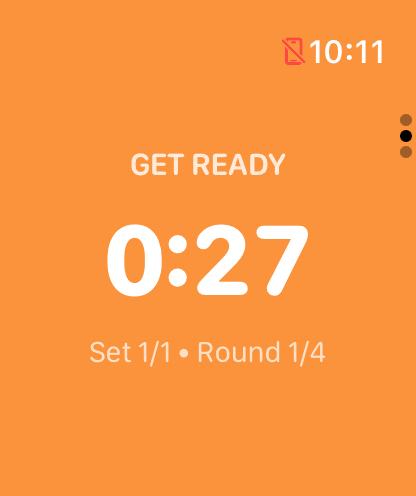
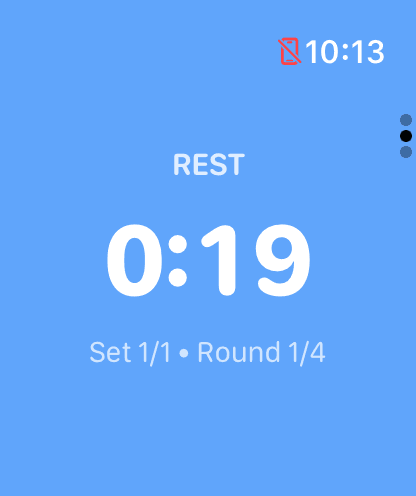
Phase-aware watchOS interval timing: the get-ready count-in (left) and a rest block (right), each with its own haptic cue on the wrist.
2. Intervals Pro
Intervals Pro is one of the more established interval timer apps on the App Store, and on the iPhone it is genuinely capable. It offers audio cues and supports a wide range of interval structures including warmup, cooldown, and custom phase sequences, all wrapped in a clean visual design. Its biggest draw for budget-conscious lifters is that it is a one-time purchase, with no subscription — you pay once and own it.
Where Intervals Pro shines is flexibility. You can build complex multi-step timers with nested groups, repeating blocks, and varying durations. If you follow structured programmes with different interval lengths each round, this level of configuration is hard to match.
The trade-off is the Apple Watch story. Based on publicly observable behaviour as of 2026, Intervals Pro does not ship a dedicated standalone Apple Watch app, so there is no real phone-free experience on the wrist — the timing lives on the iPhone. There are no Live Activities or Dynamic Island states either, and no voice cues, only audio tones. For a guide built around leaving your phone in the locker, that is the decisive gap, however strong the iPhone-side configuration is. Details may change as the app updates.
- One-time purchase — no subscription
- Complex interval nesting and grouping on iPhone
- Audio cues (no voice coaching)
- No standalone Apple Watch app — timing lives on the phone
3. Seconds Interval Timer
Seconds is a power-user interval timer with deep customisation options. It supports HIIT, Tabata, and custom templates with fine-grained control over every phase. The Apple Watch app mirrors your phone timers and provides haptic feedback during workouts.
The strength of Seconds is its deep template library and community sharing. You can download timers other users have created or build your own from scratch. The app also supports music integration, which is a nice touch if you run playlists during training.
The downside is complexity and tethering. The interface has a learning curve, and the Apple Watch experience can feel cluttered if you have many timers saved. Because the watch app works as a companion rather than running fully standalone, it generally expects your phone nearby or timers synced in advance, and setting up a new timer on the watch itself isn't practical — you really need to configure everything on your phone first. Based on publicly observable behaviour as of 2026, Seconds gates its best features behind a recurring subscription, and its Apple Watch build mirrors from the iPhone rather than running standalone. Details may change as the app updates.
- Apple Watch mirrors from the iPhone — not standalone
- Deepest template library with community sharing
- Deep customisation and music integration
- Complex UI — steep learning curve
- Subscription gates the best features
4. SmartWOD Timer
SmartWOD Timer is built for the CrossFit community, and it shows. It has dedicated modes for AMRAP, EMOM, For Time, and Tabata — the four pillars of CrossFit timing. Based on publicly observable behaviour as of 2026, its Apple Watch presence mirrors from the iPhone rather than running as a standalone watchOS app, so the phone needs to be nearby to drive the session. Details may change as the app updates.
If your training revolves around CrossFit-style workouts, SmartWOD is hard to beat for mode variety. The AMRAP mode tracks your rounds and reps, and EMOM mode handles the every-minute timing that's tedious to manage manually. The interface is purpose-built for these formats and doesn't try to be everything to everyone.
For general gym use — strength-training rest periods, standard HIIT intervals, or simple work/rest alternation — SmartWOD can feel over-specialised. The modes are designed around CrossFit conventions, so if you don't think in terms of AMRAP rounds or EMOM minutes, you might find yourself working around the app's structure rather than with it. On pricing, SmartWOD runs a free, ad-supported tier with a one-time in-app purchase to remove the ads — no subscription, but the free experience carries advertising until you pay once.
- Dedicated CrossFit modes: AMRAP, EMOM, For Time, and Tabata
- Apple Watch mirrors from the iPhone — not standalone
- Best suited for CrossFit-style programming
- Free, ad-supported tier with a one-time IAP to remove ads
5. Tabata Pro
Tabata Pro does one thing and does it well: the canonical Tabata protocol — 20 seconds on, 10 seconds off, across eight rounds — with loud, distinct audio cues. It is a one-time purchase that unlocks everything, with no subscription and nothing to apologise for if Tabata is your whole programme.
Outside that single protocol the picture narrows. Custom interval configurations are limited compared with a general-purpose timer, so the moment you mix in a longer EMOM, a boxing round, or rest-between-sets timing, you are reaching for another app. It is a specialist, not an all-rounder.
On the wrist specifically, Tabata Pro is the weakest fit for this guide. Based on publicly observable behaviour as of 2026, it does not ship a standalone watchOS app, and it has no Live Activities or Dynamic Island states — so the phone stays in the loop. If you only ever run 20/10 Tabata from your phone it is a clean, honest tool; for phone-free interval work on the wrist it is not the answer. Details may change as the app updates.
- Classic 20/10 × 8 Tabata protocol with loud audio cues
- One-time purchase — no subscription
- Limited custom interval configurations
- No standalone Apple Watch app, no Live Activities
Feature Comparison Table
Here's how the five apps stack up across the features that decide the Apple Watch interval timer category in 2026.
| Feature | GymPulseTimer | Intervals Pro | Seconds | SmartWOD | Tabata Pro |
|---|---|---|---|---|---|
| Watch app runs independently | Yes | No Watch app | Mirrored | Mirrored | No Watch app |
| Haptic Phase Cues | Yes | Phone only | Mirrored | Mirrored | Phone only |
| Complication | Yes | No | Limited | Limited | No |
| Preset Templates | Yes (iCloud sync) | Yes (on iPhone) | Deepest (community) | CrossFit modes | Tabata only |
| HealthKit Workout | Yes (from wrist) | Phone only | Phone only | Phone only | Phone only |
| Pricing | Free + one-time Pro | One-time purchase | Subscription | Free (ads) + IAP to remove | One-time purchase |
| HIIT Intervals | Yes | Yes | Yes | Via EMOM/Tabata | Tabata only |
| Best For | Phone-free gym & HIIT | Minimal pay-once iPhone timer | Large template library | CrossFit | 20/10 Tabata |
Competitor entries reflect publicly observable behaviour as of 2026 and may change as those apps update. “Mirrored” means the Apple Watch view depends on the iPhone driving the session; “No Watch app” means there is no dedicated watchOS app at all.
Which Interval Timer Is Best for Your Workout Style in 2026?
The right app depends on how you train. Here's a quick guide based on workout style.
- HIIT and general gym training — GymPulseTimer. It handles work/rest intervals, rest-between-sets timing, and multi-round configurations with a clean watch interface, distinct haptic cues, and a complication for one-tap launch. Because the watch app runs independently once presets sync, you can leave your phone behind, and the one-time pricing makes it an easy commitment.
- CrossFit and functional fitness — SmartWOD Timer. Purpose-built AMRAP, EMOM, and For Time modes mean you don't have to hack a general timer to fit CrossFit conventions. If your box programmes WODs with specific formats, SmartWOD speaks that language natively — just note its Watch view mirrors from the iPhone, so keep your phone in range.
- Nothing but 20/10 Tabata — Tabata Pro. For the single canonical Tabata protocol with loud audio cues and a one-time price, it is the simplest possible dedicated tool — though it runs from the phone, with no standalone Watch app.
- Complex, multi-phase programming — Intervals Pro for a deep, pay-once iPhone timer with nested interval groups and variable-length rounds, or Seconds for the deepest community template library. Be prepared for a steeper learning curve; remember Intervals Pro has no Watch app and Seconds, as of 2026, gates its best features behind a subscription.
For most gymgoers who want a reliable, phone-free interval timer on their wrist, GymPulseTimer hits the best balance of simplicity, features, and value. It does what you need without overcomplicating things or charging you every month.
Our Pick: Best Apple Watch Interval Timer in 2026
After running the same session through all five apps on the wrist, the verdict is straightforward. GymPulseTimer is the best interval timer app for Apple Watch in 2026 because it nails every feature that defines the category — a watchOS app that runs independently on the wrist once presets sync, a distinct haptic cue on every phase change, a complication for one-tap launch, Always-On Display, and HealthKit logging — and it does so for a single $4.99 Pro upgrade, with a free tier that's genuinely usable and no subscription in sight.
The competition each owns a niche: Intervals Pro for the most minimal pay-once iPhone timer, Seconds for its deep community template library, SmartWOD for CrossFit programming, and Tabata Pro for the canonical 20/10 protocol. But none of them runs the session independently on the wrist the way GymPulseTimer's watch app does — Seconds and SmartWOD only mirror from the iPhone, while Intervals Pro and Tabata Pro have no dedicated Watch app at all. For phone-free interval training on the wrist, that distinction settles it.
Try GymPulseTimer on Apple Watch
Free download. No subscription. Leave your phone in the locker.